Databricks Lakehouse on Google Cloud Platform
Having total 16+ years of experience, 10+ as a Java/J2EE Server Side Backend Developer, 6+ years on Cloud(AWS/GCP).
Before we understand what Databricks lakehouse platform is, its important to understand what is data lake and how is it different from traditional enterprise data-warehouse.
Data Lake vs Data Warehouse vs Data Lakehouse
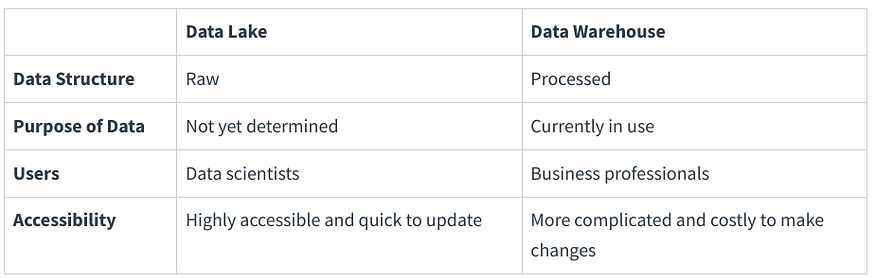
Data lakes and data warehouses are both widely used for storing big data, but they are not interchangeable terms. A data lake is a vast pool of raw data, the purpose for which is not yet defined. A data warehouse is a repository for structured, filtered data that has already been processed for a specific purpose. There is even an emerging data management architecture trend of the data lakehouse, which combines the flexibility of a data lake with the data management capabilities of a data warehouse.
What is Databricks?
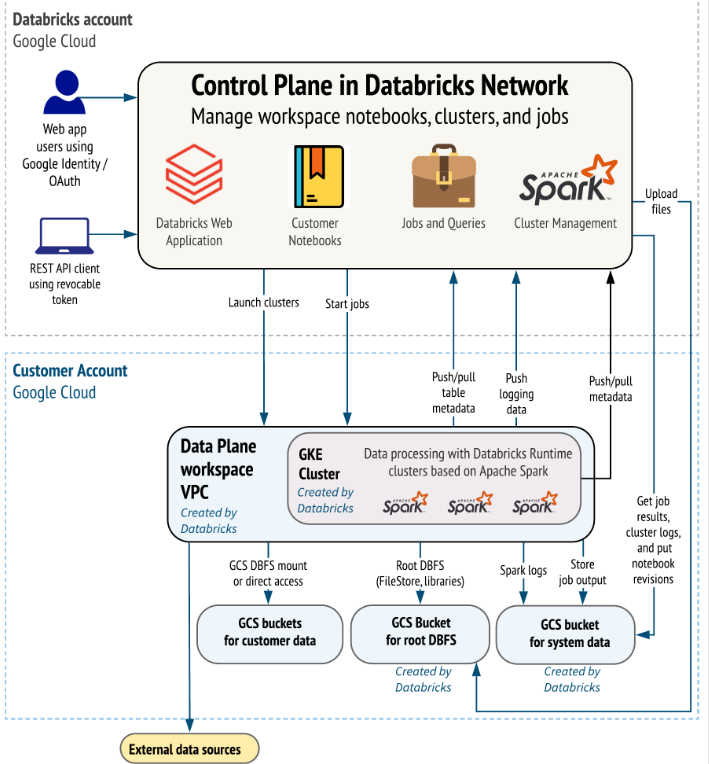
The Databricks Lakehouse Platform provides a unified set of tools for building, deploying, sharing, and maintaining enterprise-grade data solutions at scale. Databricks integrates with cloud storage and security in your cloud account, and manages and deploys cloud infrastructure on your behalf.
The Databricks Lakehouse combines the ACID transactions and data governance of enterprise data warehouses with the flexibility and cost-efficiency of data lakes to enable business intelligence (BI) and machine learning (ML) on all data. The Databricks Lakehouse keeps your data in your massively scalable cloud object storage in open source data standards, allowing you to use your data however and wherever you want.
What is Databricks used for?
Customers use Databricks to process, store, clean, share, analyze, model, and monetize their datasets with solutions from BI to machine learning. You can use the Databricks platform to build many different applications spanning data personas. Customers who fully embrace the lakehouse take advantage of our unified platform to build and deploy data engineering workflows, machine learning models, and analytics dashboards that power innovations and insights across an organization.
What are common use cases for Databricks?
The following use cases highlight how users can leverage Databricks to accomplish tasks essential to processing, storing, and analyzing the data that drives critical business functions and decisions.
Build an enterprise data lakehouse
The data lakehouse combines the strengths of enterprise data warehouses and data lakes to accelerate, simplify, and unify enterprise data solutions. Data engineers, data scientists, analysts, and production systems can all use the data lakehouse as their single source of truth, allowing timely access to consistent data and reducing the complexities of building, maintaining, and syncing many distributed data systems.
ETL and data engineering
Whether you’re generating dashboards or powering artificial intelligence applications, data engineering provides the backbone for data-centric companies by making sure data is available, clean, and stored in data models that allow for efficient discovery and use. Databricks combines the power of Apache Spark with Delta Lake and custom tools to provide an unrivaled ETL (extract, transform, load) experience. You can use SQL, Python, and Scala to compose ETL logic and then orchestrate scheduled job deployment with just a few clicks.
Delta Live Tables simplifies ETL even further by intelligently managing dependencies between datasets and automatically deploying and scaling production infrastructure to ensure timely and accurate delivery of data per your specifications.
Databricks provides a number of custom tools for data ingestion, including Auto Loader, an efficient and scalable tool for incrementally and idempotently loading data from cloud object storage and data lakes into the data lakehouse.
Machine learning, AI, and data science
Databricks machine learning expands the core functionality of the platform with a suite of tools tailored to the needs of data scientists and ML engineers, including MLflow and the Databricks Runtime for Machine Learning.
Data warehousing, analytics, and BI
Databricks combines user-friendly UIs with cost-effective compute resources and infinitely scalable, affordable storage to provide a powerful platform for running analytic queries. Administrators configure scalable compute clusters as SQL warehouses, allowing end users to execute queries without worrying about any of the complexities of working in the cloud. SQL users can run queries against data in the lakehouse using the SQL query editor or in notebooks. Notebooks support Python, R, and Scala in addition to SQL, and allow users to embed the same visualizations available in dashboards alongside links, images, and commentary written in markdown.
DevOps, CI/CD, and task orchestration
The development lifecycles for ETL pipelines, ML models, and analytics dashboards each present their own unique challenges. Databricks allows all of your users to leverage a single data source, which reduces duplicate efforts and out-of-sync reporting. By additionally providing a suite of common tools for versioning, automating, scheduling, deploying code and production resources, you can simplify your overhead for monitoring, orchestration, and operations. Workflows schedule Databricks notebooks, SQL queries, and other arbitrary code. Repos let you sync Databricks projects with a number of popular git providers.
Real-time and streaming analytics
Databricks leverages Apache Spark Structured Streaming to work with streaming data and incremental data changes. Structured Streaming integrates tightly with Delta Lake, and these technologies provide the foundations for both Delta Live Tables and Auto Loader.
High-level architecture
Databricks on GKE
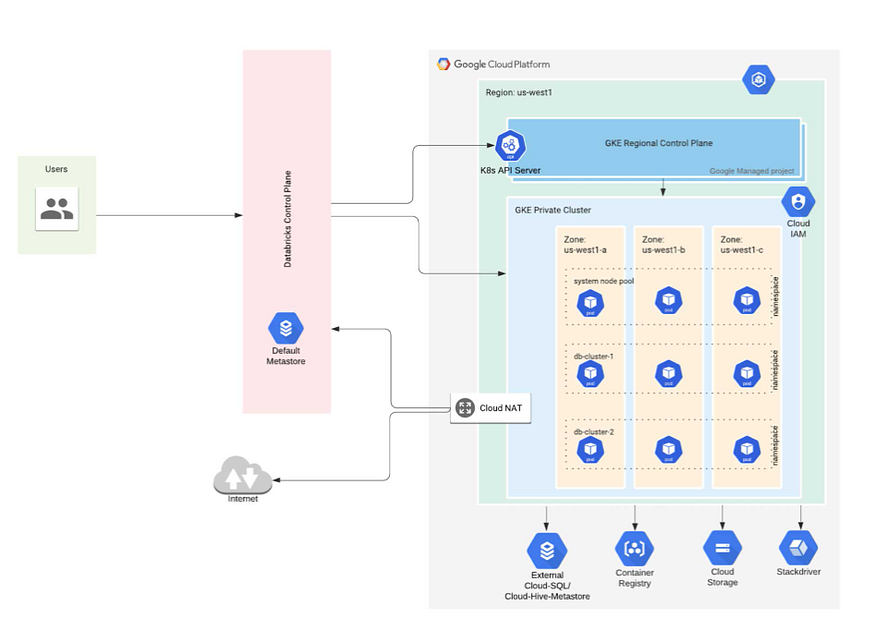
Databricks on Google Cloud is a Databricks environment hosted on Google Cloud, running on Google Kubernetes Engine (GKE) and providing built-in integration with Google Cloud Identity, Google Cloud Storage, BigQuery, and other Google Cloud technologies.
Built on Google Kubernetes Engine (GKE), Databricks on Google Cloud is the first fully container-based Databricks runtime on any cloud. It takes advantage of GKE’s managed services for the portability, security, and scalability developers know and love. Read/write access to GCS from Databricks allows customers to execute workloads faster and at lower costs.
Databricks on Google Cloud is tightly integrated with Google Cloud’s infrastructure and analytics capabilities. By integrating Databricks with Google Kubernetes Engine (GKE), customers could get a fully container-based Databricks runtime in the cloud. Furthermore, Databricks has an optimized connector with Google BigQuery that allows easy access to data in BigQuery directly via its Storage API for high-performance queries.
The integration of Databricks with Looker and support for SQL Analytics, along with an open API environment on Google Cloud, gives customers the ability to directly query the data lake, providing an entirely new visualization experience. And lastly, customers could deploy Databricks through the Google Marketplace with unified billing and one-click setup inside the Google Cloud console as soon as it becomes available.